Smokeball vs Clio: Complete comparison guide.
How does Smokeball compare to Clio? This guide will help you understand the key differences between Smokeball and Clio, and help you select the best legal software for your law firm.

Smokeball has a higher rating than Clio across independent review sites such as G2, Capterra, and Software Advice from real legal professionals.

According to G2, Smokeball outranks Clio across all of its ratings including ease of use, quality of support, ease of admin, and more


Meets requirements
Ease of use
Ease of setup
Ease of admin
Quality of support
Has the product been a good partner in doing business?
Product direction (% positive)
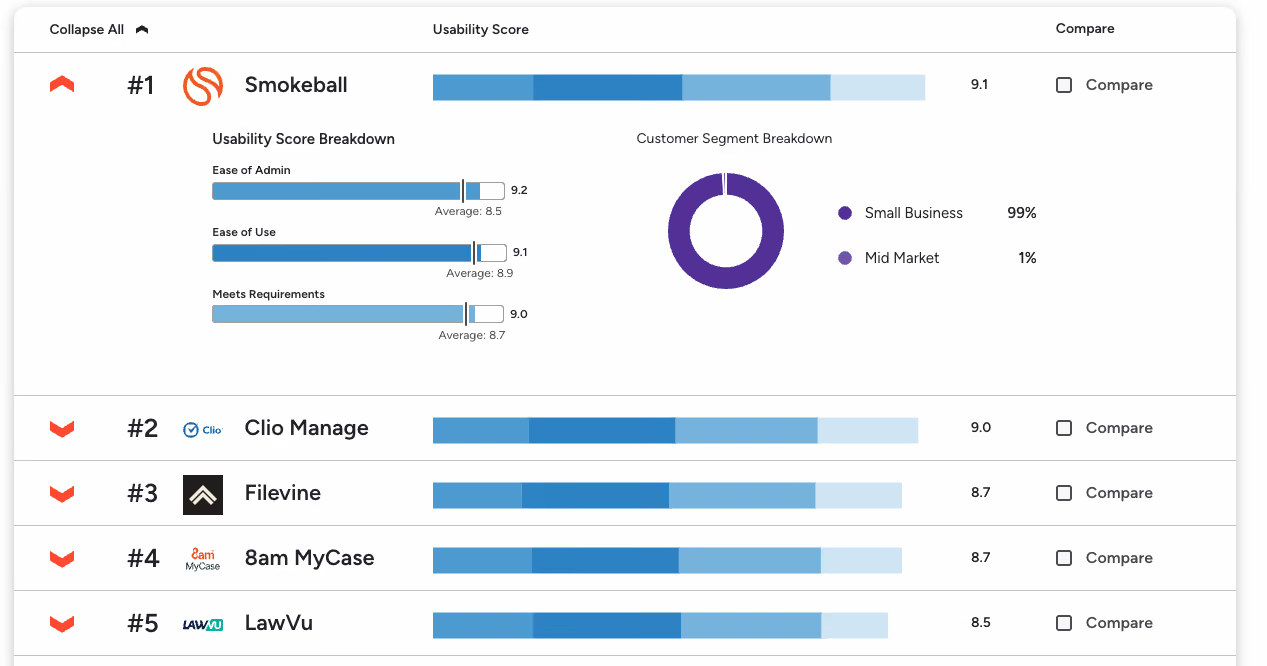
For Legal Document Management Software, G2 ranks Smokeball as the #1 easiest to use
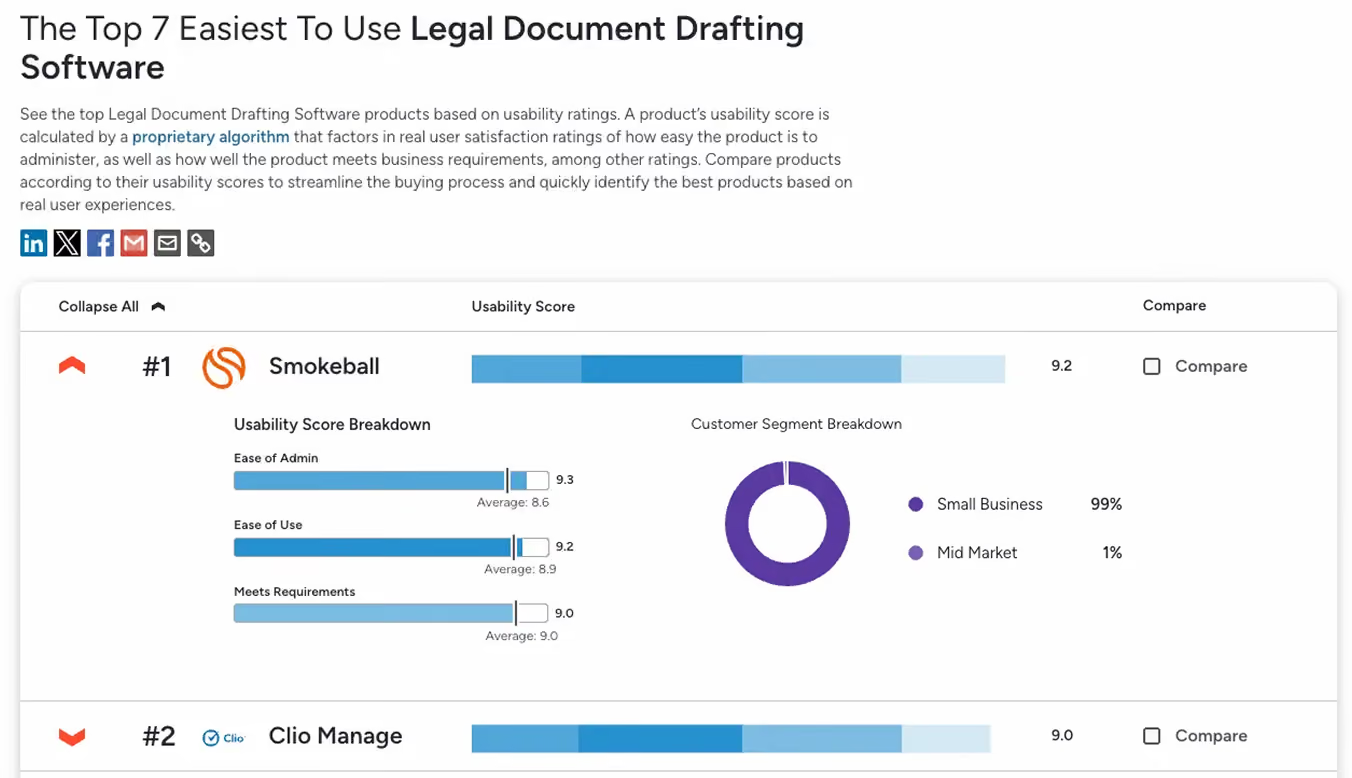
Smokeball is also the #1 easiest to use in the Legal Document Drafting Software category
“When I transferred from my previous software to Smokeball, the onboarding service was absolutely professional and excellent. I felt overwhelmed by everything involved in the software transfer, but Smokeball made the process effortless and easy for me.”
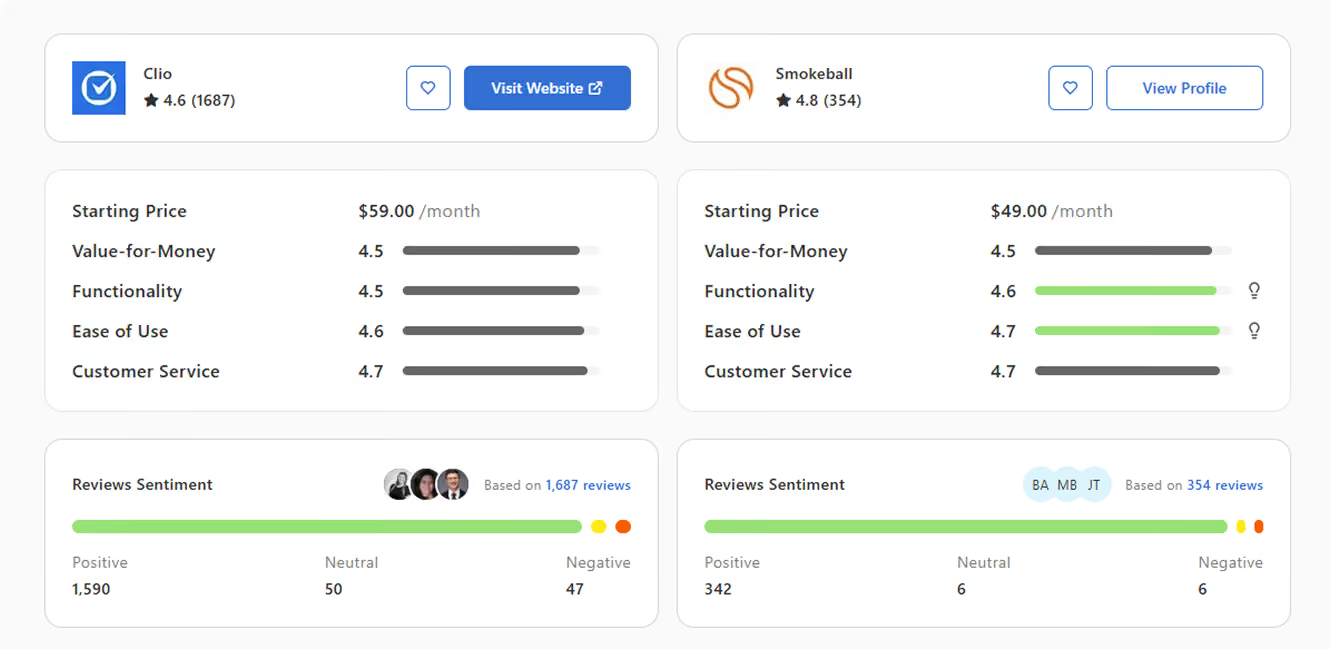
Capterra also ranks Smokeball higher at 4.8 compared to Clio 4.6, specifically Smokeball’s functionality and ease of use beating Clio
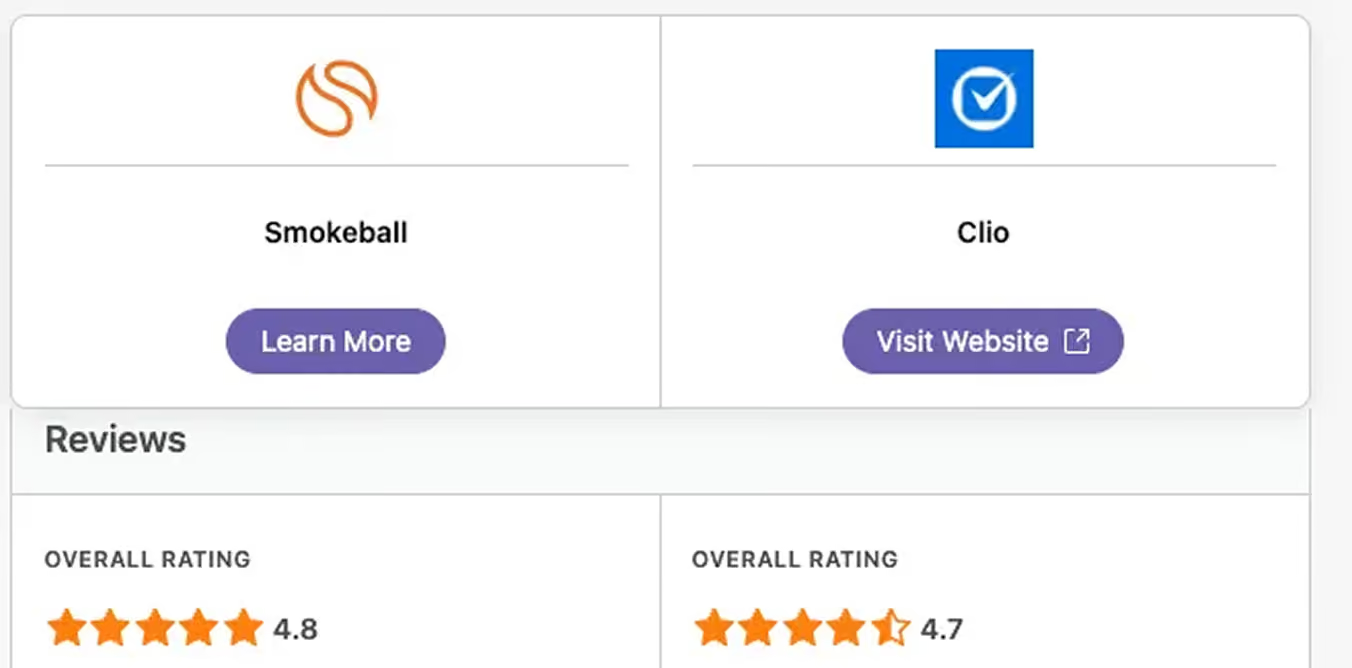
It’s also a similar story with Software Advice, with Smokeball having a higher rating of 4.8 stars out of 5
Smokeball vs Clio: Features comparison
What sets Smokeball apartIf you’re researching Clio alternatives, Smokeball should be at the top of your list. Smokeball is an all-in-one solution designed to simplify law firm operations.
Smokeball is commonly considered by firms that want:
- A more all-in-one approach with fewer third-party tools
- Greater automation to reduce manual data entry and administrative work
- Built-in legal AI features that support day-to-day legal tasks within the practice management system
- Australia-based support and training
- Software that is straightforward to adopt and use across the firm
For Australian law firms that value automation, legal AI capabilities, and local support within a single platform, Smokeball is the ideal choice to support more efficient, modern legal practice.
All-in-one functionality
Smokeball is designed as a single platform covering the full matter lifecycle - from intake and document creation to billing, trust accounting, and payments. This can reduce reliance on multiple add-ons and help firms keep workflows consistent.
Security and data protection
Protecting client data is essential for Australian firms. Smokeball operates under recognised security standards, including ISO 27001, and is built with legal-specific data protection requirements in mind.
Ease of use
Smokeball focuses on intuitive design and built-in automation, including automatic time tracking and guided workflows. This can help lawyers and support staff spend less time on administration and more time on client work.
Australian-based support and training
Smokeball provides support and training from teams based in Australia. For many firms, local support during Australian business hours and familiarity with local legal processes can make onboarding and day-to-day use easier.
FAQs
Everything you want to know before taking the next step.
What are the main differences between Clio and Smokeball?
Smokeball is an all-in-one legal practice management solution that includes document management, AI tools, automatic time tracking, and robust billing. In contrast, Clio often requires third-party add-ons or upgraded plans to access similar functionality. Smokeball also offers faster setup, easier onboarding, and award winning Australian based support.
Why do lawyers switch from Clio to Smokeball?
Lawyers often switch from Clio to Smokeball to reduce manual work and simplify daily operations. Smokeball automatically tracks time, emails, and document activity, which can help firms capture more billable work without changing habits.
Many law firms find Clio’s reliance on third-party integrations, add-ons, and manual data syncing inefficient and cumbersome. Smokeball, by contrast, consolidates legal workflows into a single platform, reduces profit leakage, and simplifies billing and payments.
How does Clio compares to Smokeball in terms of features?
Smokeball has a host of advanced but easy to use features such as document automation, automatic time tracking, form population, email filing, trust accounting, and court rules built directly into the platform. These tools are designed specifically for law firms and work together out of the box.
Clio, on the other hand, requires additional integrations and add-ons to match Smokeball in terms of features, which results in more costs and issues.
How does Clio compare to Smokeball in terms of user experience?
Compared to Clio, Smokeball has been report as more intuitive, streamlined, and easier to use. Smokeball is designed for lawyers by lawyers, with smart automation running in the background to reduce clicks and data entry.
While Clio’s interface is modern and clean, the complex setup and onboarding results in hours managing and implementing integrations and manual customization.
Is Smokeball or Clio better for a solo practice just getting started?
For solo attorneys, Clio can be appealing as a lightweight entry point into practice management. However, many solos choose Smokeball because it provides more built in functionality from day one, reducing the need to piece together multiple tools as the practice grows.
Smokeball includes case management, document automation, billing, trust accounting, and email management in one system. Its automatic time and activity tracking helps solo lawyers capture more billable work without extra effort.
If you want structure, automation, and fewer systems to manage as a new solo, Smokeball is often the stronger long term choice.
Is Smokeball or Clio better for a small law firm?
For solo attorneys, Clio can be appealing as a lightweight entry point into practice management. However, many solos choose Smokeball because it provides more built in functionality from day one, reducing the need to piece together multiple tools as the practice grows.
Smokeball includes case management, document automation, billing, trust accounting, and email management in one system. Its automatic time and activity tracking helps solo lawyers capture more billable work without extra effort.
If you want structure, automation, and fewer systems to manage as a new solo, Smokeball is often the stronger long term choice.
Is Smokeball or Clio better for a medium size law firm?
For medium size firms, Clio typically requires multiple integrations and higher tier plans to support advanced workflows, reporting, and firm wide automation.
Smokeball is built to handle growing teams with centralized matter management, automation across documents and billing, and detailed insight into firm activity. Its design supports consistency across staff while reducing manual work as volume increases.
If your firm needs scalable automation and built in legal specific tools to support growth, Smokeball is often the more robust solution.
How easy is switching to Smokeball and migrating my data from Clio?
Switching from Clio to Smokeball is designed to be straightforward. Smokeball provides guided onboarding and migration support to help firms move contacts, matters, and historical data. Many law firms have made the switch from Clio to Smokeball. Explore our client case studies to see how they’ve benefited.
Considering a Clio alternative?
If your law firm is looking for anall-in-one platformwith built-in automation, legal AI, and Australian-based support, Smokeball is designed to support more efficient, modern legal practice. Book a demo to see how we support Australian law firms.